


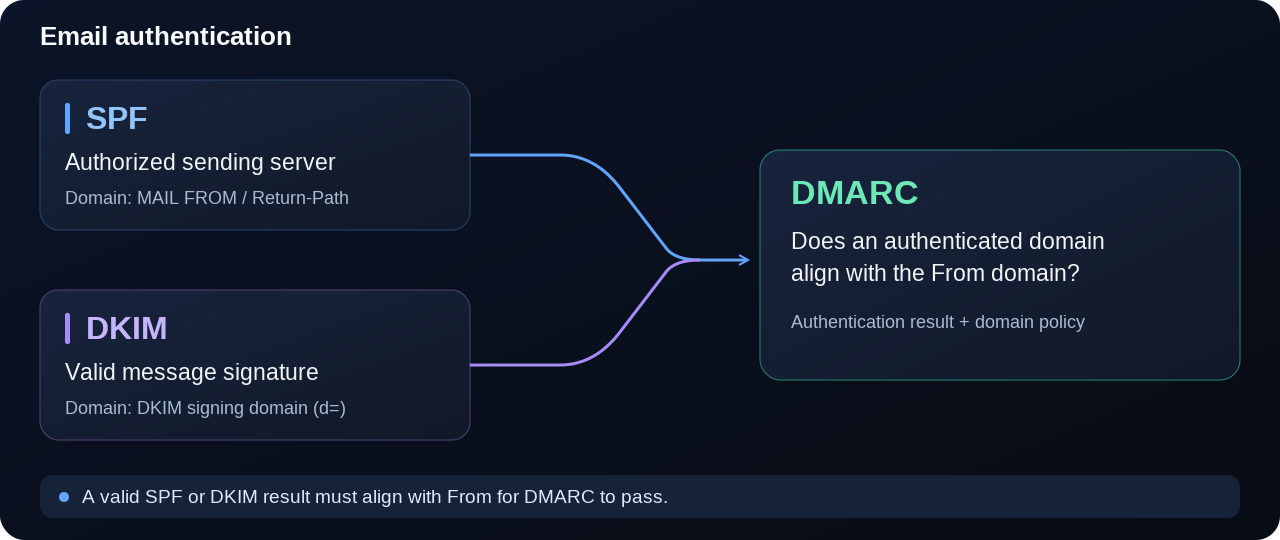
SPF, DKIM and DMARC help receiving servers verify email origins and authorized use of a domain. Each addresses a different part of authentication: SPF checks the sending server's authorization, DKIM checks a digital signature, and DMARC checks alignment with the visible sender's domain.
SPF: which servers may send for a domain
SPF compares the connecting server's IP address with rules in a DNS TXT record.
For a typical email, it checks the SMTP sender's MAIL FROM domain, usually visible
in the received message's Return-Path. This may differ from the visible From address.
SPF can also check the HELO identity, for example when the SMTP sender is empty.
The rules are defined in RFC 7208.
An SPF TXT record for example.com might look like this:
example.com IN TXT "v=spf1 ip4:192.0.2.10 -all"
The address 192.0.2.10 is reserved for documentation examples. Use your actual public IP
addresses or the SPF rules supplied by your sending providers in your own record.
ip4:authorizes the specified IPv4 address or range.include:incorporates another domain's SPF rules, for example as instructed by a sending provider.-allproducesfailfor other sources;~allproducessoftfail.
An SPF result alone does not determine final delivery. The receiving server decides whether to accept
the message. Other results include neutral, none, temperror and permerror.
Publish only one SPF record per domain name and include all sending services in it.
When extending the record, account for the limit of ten mechanisms and modifiers that require DNS lookups,
including nested include terms. Adding separate SPF records does not solve this.
See the SPF troubleshooting guide for details.
DMARC: alignment with the visible sender's domain
DMARC uses SPF and DKIM results and evaluates them against the domain in the From header.
At least one successfully authenticated domain must align with the From domain for authentication to pass.
An spf=pass result for an unrelated domain therefore does not guarantee dmarc=pass.
For SPF, the SMTP sender's domain is compared; for DKIM, the signing domain in d= is compared.
Relaxed alignment allows an organizational domain match, such as example.com
and mail.example.com. Strict alignment requires an exact domain match.
The modes are configured through aspf and adkim.
We provide DKIM signing automatically in the cloud version of doMail.
The DMARC record and domain policy
Publish the DMARC TXT record at _dmarc under the relevant domain.
A record for monitoring results and requesting aggregate reports might look like this:
_dmarc.example.com IN TXT "v=DMARC1; p=none; rua=mailto:dmarc-reports@example.com"
Replace the domain and reporting address with your own values. The p policy
expresses the requested handling of messages that fail DMARC:
| Policy | Meaning |
|---|---|
none | Does not request quarantine or rejection based on DMARC. |
quarantine | Requests treating failing messages as suspicious, for example by placing them in spam. |
reject | Requests rejection of failing messages; the receiver also considers other information. |
Adopt a stricter policy only after checking all legitimate ways your domain sends email,
including business mail, CRM and newsletters. With reject, do not rely solely on SPF;
use valid DKIM signatures too. Current rules are described in
RFC 9989.
Read the results in email headers
Open the original source or headers of a received message and find the
Authentication-Results added by the receiving server. Check both the result
and the domain it was evaluated for:
From: notifications@example.com
Return-Path: <bounces@mailer.example.net>
Authentication-Results: mx.example.org;
    spf=pass smtp.mailfrom=mailer.example.net;
    dkim=pass header.d=example.com;
    dmarc=pass header.from=example.com
Here, SPF passes for mailer.example.net, which does not align with the From domain.
DKIM passes for example.com, so the signature provides alignment and DMARC passes.
Successful authentication alone still does not guarantee inbox delivery.
What DMARC reports tell you
The rua parameter specifies an address for aggregate reports. These help identify
sources sending messages that use your domain and show authentication outcomes.
Their format is described in RFC 9990.
The optional ruf parameter requests more detailed failure reports, but not all receivers send them.
DMARC reports are not lists of individual undelivered emails in doMail. To track specific failures, use undelivered message reporting.
When connecting a domain to doMail cloud, use the records prepared for your domain and account for other services that send on its behalf. Follow the guide How to send emails from your own domain.